
Using Apache AirFlow to Orchestrate Your Data Pipeline – Dos and Don'ts
Introduction
Over the last couple of years we have witnessed more and more companies engage in exploring and even base their products and services on machine learning and big data. Hence, engineering and orchestrating large data pipelines with a lot of moving parts has become unavoidable, often requiring to work in real time and in a completely automated fashion.
Various orchestration tools have been made available, but none offer as much control over sequencing, coordination, scheduling, and managing complex data pipelines as Apache's open-source tool AirFlow. With an easy-to-use Web UI, this Python-based tool allows you to define your workflow in terms of DAGs – Directed Acyclic Graphs. It is easily integrated into Kubernetes and Celery for distributed computing, and unlike Cron Jobs, tasks directly depend on the tasks that precede them and are executed when the upstream finishes. In this article we will be sharing tips and tricks on how to use AirFlow to its full potential.
1. How to use other languages
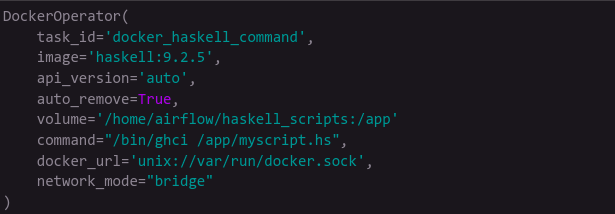
While the DAG itself has to be written in Python, the orchestrator should never force us to write our jobs in a specific language. For Python and Bash there are the PythonOperator and BashOperator, but other languages potentially don't have dedicated operators. Use the DockerOperator. With it you can specify the environment needed to run your code, even what exact version of compiler or interpreter. You can use DockerHub, AWS ECR images, or private images via the docker_conn_id argument. If you use Kubernetes, the KubernetesPodOperator achieves the same goal — you can control pod resources, define task priorities, and have XCom communication by writing results into /airflow/xcom/return.json.
2. How to communicate between tasks
AirFlow Variables are a global variable space for all DAGs. You can set them from the UI, pull from the environment, or connect to AWS Parameter Store for encrypted secrets. For DAG-scoped values, use XCom for inter-task communication. When passing simple strings this is perfect. As of AirFlow 2.1, pass render_template_as_native_obj=True to the DAG constructor to preserve object types. Never pass large objects to XCom — the backend DB stores all values permanently and you risk bloating it. Use AWS S3 or Redis for large objects, making paths specific to the DAG run to avoid concurrency issues.
3. How to split large jobs
For large ETL workloads, use Apache Spark for distributed batch processing and AirFlow just to schedule the operation. If unavailable, avoid hard coding and evaluate at runtime. AirFlow 2.3 offers dynamic task making — determine at runtime how many instances of a job are needed and run them in parallel.
4. How to reuse code and DAGs
Pass the params argument with default values to increase DAG reusability. Trigger DAGs from other DAGs with TriggerDagRunOperator, using dag_id and conf parameters and the wait_for_completion flag. Avoid legacy SubDAGs — use TaskGroups instead, which reduce everything to one expandable field visually and avoid performance issues.